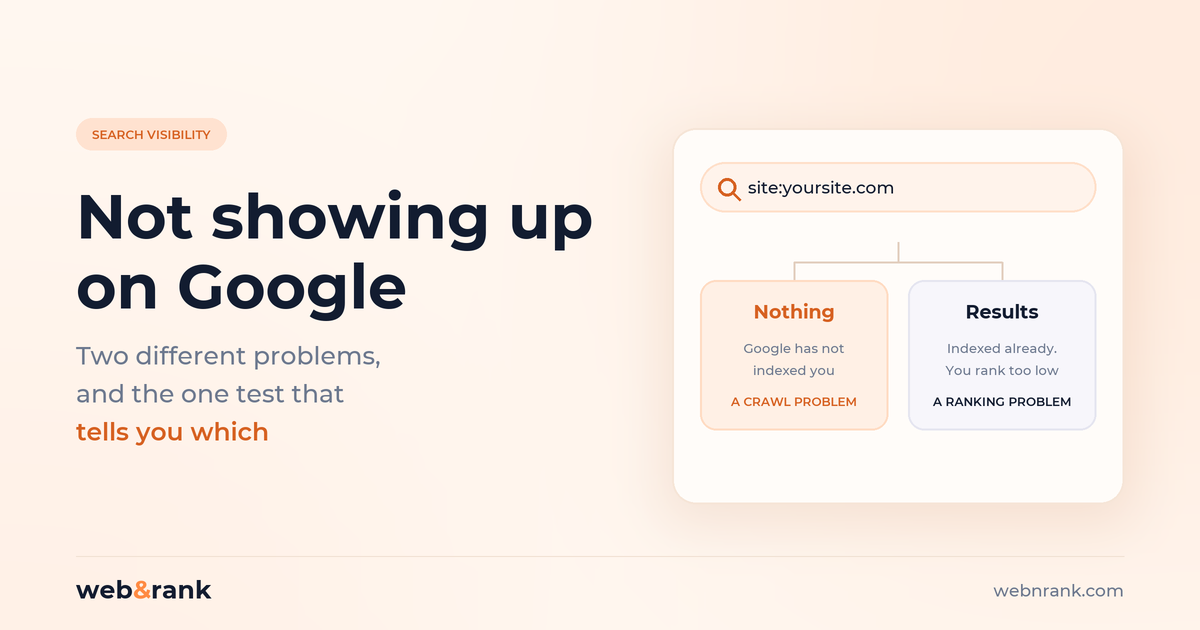
The short version. “Not showing up on Google” is two completely different problems wearing the same sentence, and the fix for one does nothing for the other. One search tells you which you have.
- Search
site:yourdomain.comin Google. Nothing back means you are not indexed. Results back means you are indexed and simply ranking too low to see - Those need opposite work: one is a crawling problem, the other is a competition problem
- On WordPress, the single most common cause is a checkbox in Settings that someone left ticked at launch
- Blocking a page in robots.txt does not remove it from Google, and it stops Google seeing a noindex tag, which is the opposite of what most people expect
- A new site takes days to weeks to appear, and no amount of resubmitting speeds that up
A kitchen fitter rang us last spring, fairly upset, because his new website had been live for three weeks and “wasn’t on Google”. He had paid for it, he had checked every day, and nothing.
His site was indexed perfectly well. What he had actually been doing was searching “kitchen fitter” from his own phone, in a town of forty thousand people, and scrolling the first page. He was on page three. That is not an indexing problem, and nothing his developer could do to the site would have fixed it that week.
The same sentence, “we’re not showing up on Google”, gets used for both of these. They need opposite work, so the first job is always to find out which one you have.
The one search that tells you which problem you have
Go to Google and search for this, with your own domain and no space after the colon:
site:yourdomain.com
If you get no results at all, Google has not indexed your site. That is a crawling and indexing problem, it is usually mechanical, and it is usually fixable in an afternoon.
If you get a list of your pages back, you are indexed. Google knows you exist and has your pages on file. You are not invisible, you are just being outranked. That is a competition problem and it takes months, not an afternoon.
One caveat worth knowing: the number of results on a site: search is a rough signal, not an exact count of what Google has indexed. Use it to answer yes or no, not to track progress week by week. For that, use the Page Indexing report in Google Search Console, which is free and is the only place you see what Google actually thinks of your site.
If nothing came back: you are not indexed
Work through these in order. The first two account for most of what we see.
1. The WordPress checkbox nobody remembers to untick
In WordPress, under Settings, then Reading, there is an option called “Discourage search engines from indexing this site”. Developers tick it while a site is being built, for good reason, and then the site goes live and nobody unticks it.
It adds a noindex instruction to every single page. The site looks perfect to a visitor and is deliberately invisible to Google. We have found this on sites that had been live for over a year, and it is the first thing we check on any new engagement.
2. A noindex tag left somewhere else
Same instruction, different source: an SEO plugin set to noindex, a staging template that got copied to production, a theme option. View the page source and search for noindex. If it is in there, that page is asking Google to stay away, and Google will.
3. Robots.txt blocking the site, and the trap inside it
Visit yourdomain.com/robots.txt. If you see Disallow: / under User-agent: *, you are telling every crawler to stay out of the whole site.
Here is the part that catches people, and it is worth reading twice. Blocking a page in robots.txt is not the same as removing it from Google, and the two interact badly. Google’s own documentation is explicit:
“For the
noindexrule to be effective, the page or resource must not be blocked by a robots.txt file… If the page is blocked by a robots.txt file or the crawler can’t access the page, the crawler will never see thenoindexrule, and the page can still appear in search results.”
So if you want something out of Google, blocking it in robots.txt is precisely the wrong move: Google can no longer read the noindex you added, and the page can linger. Let it be crawled, and let it carry the noindex.
4. The site is genuinely new
Google has to find you, crawl you, and decide to keep you, and that is not instant. Google’s guidance on requesting indexing puts it plainly: “Crawling can take anywhere from a few days to a few weeks.”
You can nudge it. Set up Search Console, submit your sitemap, and use the URL Inspection tool to request indexing for your most important pages. What you cannot do is speed it up by repeating yourself. Google notes there is a quota on those submissions, and requesting the same URL again will not get it crawled any faster.
5. Nothing links to you, internally or externally
Google finds pages by following links. A page that nothing points at, with no sitemap entry and no external mention, is a page Google may simply never reach. This is why orphaned pages stay unindexed for months while the rest of the site is fine.
Check that your important pages are reachable from your own navigation in two or three clicks, and that they appear in your XML sitemap.
6. The site is blocked at the server, not in the code
Less common, but it happens: a password-protected staging environment pushed live, a firewall rule blocking Googlebot, a plugin in maintenance mode. If the code looks clean and the site still will not index, this is where to look next.
If results came back: you are indexed and ranking too low
This is the kitchen fitter’s problem, and it is much more common than the first category. A few honest things about it.
You are probably searching for something nobody else searches for
Business owners search their own business name, or the exact service phrase they use internally. Customers do not. They search the problem, the place, or the thing they want, in their own words. Ranking well for a phrase nobody types is the same as not ranking at all.
Page two is invisible, and page four may as well not exist
If you are at position 34, you are “on Google” in the technical sense and absent in every sense that matters. The gap between page one and page three is not a small gap to close, which is the part that annoys people most.
Your own search results are not what others see
Google personalises by location, history and device. Checking from your office, logged in, on the same device you have visited your own site from a hundred times, flatters your position. Use an incognito window at minimum, and bear in mind that someone twenty miles away sees something different again.
For local businesses, the map pack is a separate competition
Those three local results with the map sit above the ordinary listings and are driven largely by your Google Business Profile, not your website. You can be first in the map pack and nowhere in the blue links, or the reverse. If you serve a local area, that profile needs its own attention, which we cover in our local SEO work.
Platform quirks worth knowing
Most website builders have their own version of the WordPress checkbox.
- Wix: SEO settings have a “Let search engines index” toggle per page, and a site-wide equivalent
- Squarespace: individual pages can be hidden from search engines in page settings, and pages sitting in the “Not Linked” section are easy to forget
- Shopify: password protection on a store blocks everything, and collection and tag pages often carry canonical tags pointing elsewhere by design
- WordPress: the Reading setting above, plus whatever your SEO plugin is set to
None of these are faults in the platforms. They are all sensible features that someone forgot to turn off.
What to actually do this week
In order, and most of this is free.
- Run the
site:search and decide which problem you have. Do not skip this, because everything after it depends on the answer - If you are not indexed: check the WordPress Reading setting, view the page source for
noindex, and read your robots.txt. That is three checks and about ten minutes - Set up Google Search Console if you have not, and submit your sitemap. The Page Indexing report will tell you what Google is excluding and why, in its own words
- If you are indexed: open an incognito window and search the phrases your customers would actually use, not the ones you use. Write down where you really come
- Only then decide whether this is a technical job, a content job, or a patience job
Most of the first category is a technical SEO fix and genuinely quick. The second category is slower work, and anyone promising page one in thirty days for a competitive term is selling you something. If you want to see what the slower version looks like with real numbers attached, our case studies have the figures from Search Console rather than adjectives.
One related thing worth saying, because it catches people who have just fixed this: getting found is only half of it. Once the enquiries start arriving, how fast you reply decides how many of them you keep, and that is a build problem rather than a sales problem. There is no point winning the ranking and then losing the lead to whoever answered first.
Common questions
Why is my website not showing up on Google?
Either Google has not indexed it, or it has indexed it and you are ranking too low to see. Search site:yourdomain.com to find out which. No results means an indexing problem, usually a noindex tag, a robots.txt block or a site that is simply too new. Results means a ranking problem, which is slower work.
How do I get my website to show up on Google?
Make sure nothing is blocking indexing, then set up Google Search Console, submit your XML sitemap, and request indexing for your most important pages. After that it is a matter of having pages that answer what people search for, and earning enough credibility that Google prefers them to the alternatives.
How long does it take for a new website to show up on Google?
Google says crawling can take anywhere from a few days to a few weeks, and that matches what we see. Appearing at all is usually quick. Ranking for anything competitive takes months, and the two get confused constantly.
Why is Google not indexing my website?
The usual causes, in the order we find them: a noindex instruction left on from development, the WordPress “Discourage search engines” setting, a robots.txt disallow, pages nothing links to, or a site that was only launched days ago. Search Console’s Page Indexing report names the reason for each excluded page.
Why can’t I find my website on Google when I search my business name?
If a site: search returns your pages but your business name does not, you are usually competing with a bigger entity using a similar name, or your name is a common phrase. Check an incognito window first, since your own results are personalised.
Does blocking a page in robots.txt remove it from Google?
No, and it can make things worse. A blocked page can still appear in results, and because Google cannot crawl it, it will never see a noindex tag on that page. To remove something properly, allow crawling and use a noindex instruction instead.
Is my WordPress site not showing up because of a setting?
Very often, yes. Settings, then Reading, then “Discourage search engines from indexing this site”. If that is ticked, every page carries a noindex and the site is invisible by design. Untick it, save, and request indexing in Search Console.