Business automation services for the work nobody should be doing by hand
Right now somebody on your team is copying an enquiry out of an inbox into a spreadsheet, then into the CRM, then typing a quote that repeats the same facts a third time. We find those loops, count what they cost you, and build the thing that removes them. Business automation services for teams across the US, UK, Canada, Australia and New Zealand.

Where the hours actually go
Most teams cannot say what their manual work costs, because it is spread across six people in ten minute slices. So we count it before we quote. The figures here come from a five person services team, written down before anything was built.

What the count turns up almost every time
- The same customer detail gets typed into three systems, and by Friday one of them disagrees with the other two
- Follow up happens when somebody remembers, which is not a schedule
- The weekly report takes two hours to build and ninety seconds to read
- Nobody owns client onboarding, so new work waits behind an email that never got sent
- Data entry goes to whoever is least busy, so it gets done differently every week
The count is free
It is one call, a look inside your CRM and the tools around it, and a short written list of what is worth automating and what is not. You keep the list whether or not you hire us.
Two platforms we build on most
CRM automation is where nearly all of this work lands, and most clients arrive on one of these two. If you already pay for something else, that is fine, and the section after this covers how we handle it.
Built for service businesses that live on inbound enquiries. Pipelines, two way SMS, sequences, booking calendars and review requests sit in one account, which keeps both the monthly bill and the debugging in one place.
- Enquiry to booked call with no human step
- Missed call text back and no-show recovery
- Review requests that fire after the job
- Pipelines that match how you actually sell
For teams that have outgrown a simple pipeline and need reporting a board will accept. Flow Builder, validation rules, approval steps and the integrations that keep Salesforce agreeing with your finance system.
- Flow Builder instead of a pile of one off connectors
- Sandbox first, so nothing is tested on live records
- Approval steps with a named owner
- Reporting that matches how the business is measured
The jobs we automate first
Our workflow automation services usually start with these six, listed in the order they tend to pay for themselves.
Lead capture and routing
Every enquiry from your forms, phone and chat arrives in the CRM as one record, assigned to a person, with the source kept. It ends the daily question of who is following this one up.
Follow up that does not rely on memory
Email and SMS triggered by what the contact did, with a stop rule so nobody gets chased after they have replied. Appointment reminders cut no-shows because they run on a timer rather than a to-do list.
Quotes and invoices
A won deal raises the invoice in your accounting tool with the right line items, and payment moves the deal along the pipeline. Accounts payable approvals stop living in a chat thread.
Client and employee onboarding
One checklist that sends the welcome email, creates the folder, books the kickoff and tells the team. Employee onboarding runs on the same rails, which matters more than people expect.
Keeping your tools in agreement
Sync between the CRM and the systems that hold the same person under a different ID. Webhook in, API out, with a log you can read on the day something disagrees.
Reporting that builds itself
The dashboard your Monday meeting needs, pulled live from the CRM instead of pasted into a spreadsheet the night before.
What we build it with
There is no single correct tool here, and the honest answer is usually the one you are already paying for.
Native first, connectors second
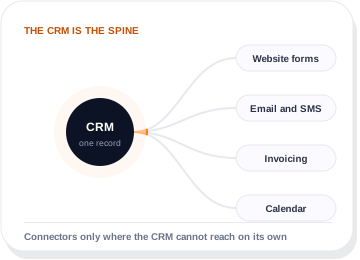
If your CRM can do the job on its own, we build it there. Native automation runs faster, adds no monthly fee and survives a plan change. We reach for Zapier, Make or n8n when a step has to cross a boundary the CRM cannot reach on its own, and we choose between them on price and on how hard the flow will be to debug a year from now.
Already on HubSpot, Pipedrive or an ERP?
Then that is the spine and we build around it. We would rather work inside the stack you have than argue for a migration you never asked for. Where the answer is genuinely a new tool rather than a connected one, that becomes a build instead, and our software development services page covers how those run.
Where RPA and process mining fit
Robotic process automation earns its keep when a system has no API at all and something has to click through a screen the way a person would. It costs more to maintain than a webhook, so we treat it as a last resort. Process mining and formal business process management are the same story: worth real money at enterprise scale, overkill for a team of twelve.
Automation goes wrong in four ways
Business automation is not a product you buy, it is a set of decisions, and we have been called in to undo all four of these. Knowing them before you start is most of the job.
The broken process just gets faster
Automating a workflow nobody agrees on produces the wrong answer more often, and now at speed. If your quoting rules only exist in one person’s head, we write them down before building anything.
One flow, forty steps, no owner
A flow only its author understands is a liability the day that person leaves. We keep them short, name them so a stranger can follow them, and document what each one does so your team can change it without calling us.
Nothing tells you when it breaks
Most automations fail quietly, and you find out from a customer. Every flow we build gets error handling: a retry, then an email to a named person, then a log entry saying which record and which step.
Judgement gets automated by accident
Pricing an unusual job, handling an angry customer, approving a refund. Those need a person. We automate the fetching and the typing that surround the decision, never the decision itself.
What it looks like when it works
Real numbers from real builds, each with the full case study behind it. If a claim on this page has no case study attached, we have not made it.
A GoHighLevel setup connected to the store now follows up every abandoned cart by text and brings buyers back for repeat orders. Two weeks to build, and the rate has held ever since.

A residential cleaning service. Online booking and an instant quote calculator meant enquiries stopped getting lost in direct messages, and a quote went out without anyone typing it.
However the numbers land, you finish with a written record rather than a black box:
- What each flow does, in plain English
- Which account and login it runs in
- Who receives the email when it fails
Rated 4.9 out of 5 across more than 2,800 client reviews
We work with clients directly and on monthly retainers. We also work through Fiverr and Upwork, where we hold Top Rated and Top Rated Plus status. Here is what a few recent website and SEO clients said.


- Verified on Upwork
- Verified on Upwork
- Verified on Fiverr
- Verified on Upwork
- Direct client
- Verified on Upwork
- Verified on Fiverr
- Verified on Upwork
How the first six weeks run
Six weeks is the usual shape, whether you need CRM implementation services from scratch or automation added to a system you have run for years. The first fortnight is CRM consulting rather than building, and it is the reason the build does not get thrown away in month four.
Week one: count and map
We sit with the people doing the work, write down every step they actually take, and mark the ones worth automating. You get the map and a shortlist.
Week two: agree the rules
The awkward part, and the one that decides whether this lasts. What counts as a qualified lead, when a quote needs a human, which fields must never be blank. Written down and signed off.
Weeks three to five: build and test
Built in a sandbox or against test records, never on live data. Every flow gets error handling and a log before it goes anywhere near a real customer.
Week six: switch on and hand over
We turn it on, watch it for a week, then hand over the documentation and a walkthrough recording. Your team can edit what we built without us in the room.
Business automation services questions
Two platforms have their own pages: GoHighLevel and Salesforce.
Not sure what is worth automating?
Tell us the one job your team complains about most. We will say on the call whether it is a flow, a fix or something you should leave alone.
What do business automation services actually cost?
A first build is usually 2,500 to 8,000 US dollars depending on how many flows and how messy the data is, plus whatever your CRM and connector subscriptions come to. The count in week one is what turns that into a real number rather than a guess, and it is free. Ongoing support is optional and priced separately.
How soon does it pay for itself?
The lead follow up and quoting flows are usually the quick ones, because a faster first response wins work you were already paying to attract. Invoicing and reporting take longer to show up in the numbers but they are the ones your team notices first. If a flow cannot pay for itself we will say so in week one instead of building it.
Do we have to change CRM?
No, and we will push back if you suggest it without a reason. We build inside HubSpot, Pipedrive, Salesforce and GoHighLevel, and we have connected plenty of others. A migration is a separate project with its own risks, so it needs a better argument than the automation being slightly tidier afterwards.
What is the difference between business process automation and RPA?
Business process automation, or BPA, connects systems through the front door: an API, a webhook, a native trigger inside your CRM. Robotic process automation drives the screen instead, clicking and typing the way a person would, and you only need it when a system offers no other way in. BPA is cheaper to run and far less likely to break when a vendor changes a button.
Will this replace anyone on the team?
In our experience it moves people onto work that was being neglected rather than out of the door. The hours we take back are the ones nobody wanted: retyping, chasing, copying between tabs. What it does change is how many customers the same team can handle without anything falling through.
Who owns the automations when we stop working together?
You do. They live in your accounts, under your logins, on your subscriptions, and the documentation is written for somebody who was not in the room while we built it. We have taken over enough undocumented systems to know how much that matters.
Can you fix automation somebody else built?
Yes, and it is a decent share of what we do. The usual finding is a long flow with no error handling that has been failing silently for months. We audit what exists, tell you what to keep, and rebuild the parts that cannot be trusted.
Tell us what you need and we will show you how we would do it
Share a few details about your business and what you want to fix or build. It could be a new website, a WordPress site that keeps breaking, SEO that has stalled, or a sales process that needs automating. We will come back with honest advice, even if that means a smaller job than you expected.
A reply within one business day
A real person on the team reads your message and replies, usually the same day.
A free review of your current setup
We look at your website, rankings or systems before we talk, so the call is useful.
A written proposal
You get a clear scope, timeline and price in writing before any work starts.
Prefer to talk first?